Issue:
Domino server is sending to 2 servers setup with DNS MX addresses with same weight and two IPs. However, routing is slow with "transient errors" received.
Solution:
There is none that we can find. However, politics determined that issue was with our sending Domino server.
Hints and Tips:
1. Turn up mail routing logging to more detail.
2. Issue tell router show queue command often so you can see what router threads are hung and for what reason.
We saw two errors repeatedly:
1. "Transient error received"
15 Retry(1) SMTP [$Retry 10.10.10.100] (Push) Last Error: Transient error received.
2a. "Unable to find path to server..."
3638 Busy(12) SMTP DNS.SERVER.FQDN (Push) 1 Retry( 2) NRPC EXTERNALDOMAIN (Push) Last error: Unable to find path to server. To trace this connection, use File - Preferences - User Preferences - Ports - Trace (Notes client) or Trace command (Domino server) Next retry: 10/31/2012 02:54:25 PM
2b. "Busy"
2529 Busy(1) SMTP [10.10.10.101] (Push)
We improved the situation by taking DNS out of the picture. We created a second SMTP Domain connection document along side the first. We removed the DNS name from the 1st. We put the 1st IP in the 1st one, and the 2nd IP in the 2nd one. We then restarted the router. The difference was noticeable. Instead of all the threads trying one IP and then the other alternately, they router threads were now containing both IPs simultaneously as the Domino server had 8 mail1-8.box files.
Other router commands/options:
> tell router dump r
This tells the router to dump/print the current routing table in memory.
> tell router update config
This command tell the router to get configuration changes from the configuration doc and or notes.ini settings. It will not create new mail.box(es) with this command, but is very useful to apply new configuration immediately, rather than wait for the router's next scheduled internal interval. BTW, to create new mail.box(es) a full "restart server" command is needed.
> route domservernm
This command routes mail now, rather than waiting till next schedule mail routing. Useful when connection document is set to route mail when 5 messages are queued, and it's late at night and we want something to go now.
OS Terminal Commands:
$ ifconfig
(linux and mac - returns info on all interfaces)
$ ifconfig en0
(linux and mac - returns info on one interface named en0)
$ ipconfig /all
(windows)
$ netstat -an
(linux, mac, and windows - returns the local addresses, foreign addresses, and the tasks assigned/going to each address.
$ nslookup
> server dnsservertotest.mindwatering.net
> dnsname.mindwateringclient.com
<read output>
(linux, mac, and windows - returns the domain records for the domain entered from the specific server specified. Leave out the server command to use the default workstation DNS.)
$ traceroute dnsname.mindwateringclient.com
<read output>
(linux, mac - returns the path if the network switches are configurated to do so with the path breadcrumbs to a destination server.)
$ tracert dnsname.mindwateringclient.com
<read output>
(windows equivalent)
Domino Configuration and Connection Documents for Round Robin and Failover
- Failover is trying first option first, and second option second, etc., one at a time
- Round-robin is going back and forth between multiple options and spreading out the SMTP load.
Ways to Configure Outgoing SMTP:
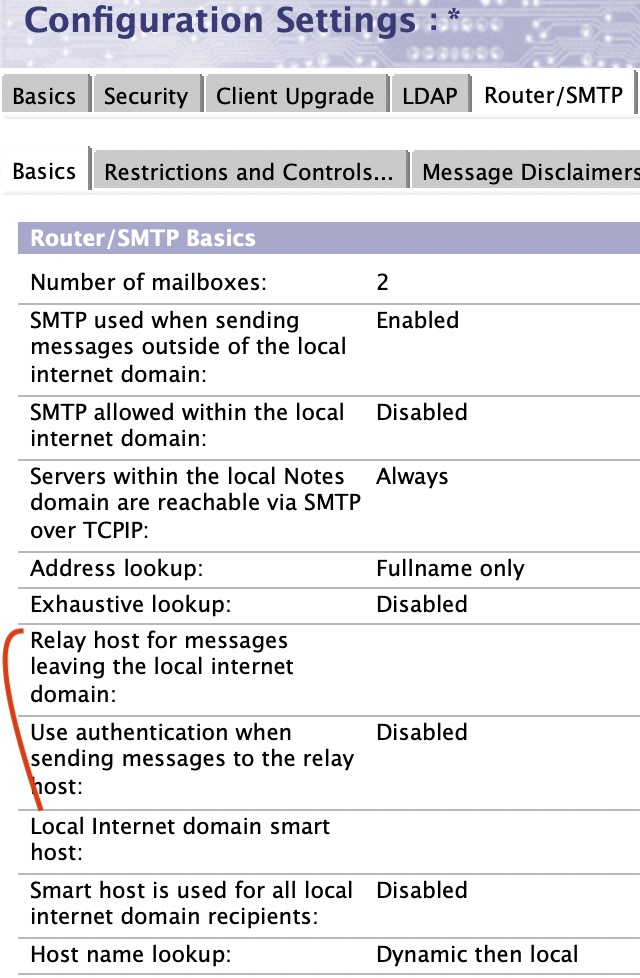
1. Configuration Document --> Router/SMTP (tab) --> Basics (sub-tab) --> Relay host (field)
2. Domain Doc w/Connection Documents
- Connection Doc --> Server, Domain, and SMTP relay host fields.
How to Specify Failover:
- Use square brackets around each value, and another set around the whole list.
- Separate each value with a semi-colon
Example:
[[10.0.10.2];[mailgateway.mindwatering.net]]
How to Specify Round Robin:
- Use square brackets around each value, and another set around the whole list.
- Separate each value with a comma
Example:
[[10.0.10.2],[mailgateway.mindwatering.net]]
Connection Document - SMTP Relay host for "Internet" domain:

Configuration Settings Document - Router/SMTP tab:
previous page
|